
Download Pika Super Wallpaper – free, dynamic, 3D, live wallpapers, Windows, Mac
Overview
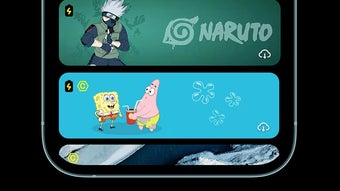
Pika Super Wallpaper is a free desktop personalization tool developed by Pika! Studio, designed to transform static device backgrounds into immersive, animated experiences. The software enables users to enhance their digital environment with visually rich, dynamic wallpapers featuring a diverse array of themes, including robots, anime characters, celestial bodies, pets, and natural landscapes. By leveraging real-time animation and interactive elements, the app turns a standard screen into a living canvas, offering a refreshing alternative to traditional static images. It is particularly suited for users seeking creative self-expression through their device interface, including digital artists, anime enthusiasts, and tech-savvy individuals who value aesthetic customization.
The application’s core purpose lies in delivering an engaging visual experience while maintaining accessibility through a straightforward interface. Users can explore a curated collection of animated backgrounds and adjust settings to match personal preferences. While the developer did not provide additional system requirements, the app is available for both Windows and Mac platforms. Real-world usage scenarios include daily desktop personalization, thematic customization for events or seasons, and enhancing the visual appeal of work or gaming setups. The software supports continuous content updates, ensuring that the wallpaper evolves over time, offering a sense of ongoing novelty and engagement.
Key Features & Capabilities
- Dynamic 3D Wallpapers – Offers visually immersive animations featuring robots, anime, stars, pets, and landscapes, creating a sense of depth and realism on the screen.
- Real-Time Content Updates – Automatically refreshes the wallpaper with new dynamic content, ensuring the background remains engaging and never static.
- One-Key Preview & Instant Setting – Allows users to instantly preview and apply any wallpaper with minimal interaction, streamlining the customization process.
- User-Friendly Interface – Features clear, well-organized menus and intuitive navigation, enabling effortless access to themes, settings, and customization options.
- Customization Options – Supports adjustments to animation speed, theme selection, and visual effects, allowing users to tailor the experience to their preferences.
- Multi-Mode Settings – Provides various display modes to suit different user needs, such as performance optimization or visual richness.
These features collectively enhance user engagement by combining artistic design with functional adaptability. For example, a user can set a celestial-themed wallpaper that shifts subtly throughout the day, or choose an anime character that reacts to mouse movement. The app’s ability to deliver consistent visual refreshes helps maintain long-term interest, making it ideal for users who enjoy a constantly evolving digital environment. The lack of in-app purchases or premium features ensures a straightforward, ad-free experience, aligning with its free-to-use model.
User Interface, Workflow & Performance
The user interface of Pika Super Wallpaper is structured around simplicity and visual clarity. Menus are logically organized, with categorized themes and intuitive icons that guide users through the selection and customization process. Navigation is smooth, allowing quick access to favorite wallpapers, recent selections, and settings. The one-key preview function enables immediate visualization of changes before applying them, reducing trial-and-error and improving workflow efficiency.
Workflow efficiency is enhanced by the app’s streamlined setup process and minimal user input requirements. Users can select, preview, and apply a wallpaper in under 10 seconds. However, the developer did not specify resource usage details, so exact performance behavior remains unknown.
General software behavior patterns suggest that dynamic 3D animations may impact system resources, particularly on devices with lower-end hardware. The app’s stability and CPU/RAM usage are not publicly documented, and no performance benchmarks were provided. Users should be aware that continuous animation may contribute to increased battery consumption, especially on laptops.
The app appears to run in the background without reported crashes, but long-term reliability under sustained use has not been verified.
Compatibility & System Requirements
Pika Super Wallpaper is compatible with both Windows and Mac operating systems. The software has a file size of 128MB, indicating a relatively lightweight installation. However, the developer did not provide additional system requirements, including minimum RAM, processor specifications, or graphics capabilities.
As such, exact hardware compatibility cannot be confirmed. Users should consider that dynamic 3D wallpapers may require a capable GPU for smooth rendering, though this is not explicitly stated. The app does not specify whether it supports older OS versions or touch-enabled devices.
Installation is straightforward, and the software does not require administrative privileges based on available information. Platform-specific behavior may vary, but no differences were reported in the provided details.
Pros and Cons
Pros
- Free to download and use with no in-app purchases
- Offers visually stunning, dynamic 3D wallpapers across diverse themes
- Intuitive interface with one-key preview and instant setting
- Supports real-time content updates for a constantly evolving experience
- Customizable animation and theme settings for personalization
- Lightweight installation size (128MB)
Cons
- Potential impact on battery life due to continuous animation
- No publicly available system requirements or performance data
- Limited information on hardware compatibility beyond OS support
- May cause higher CPU or GPU usage on lower-end devices
- Developer did not specify update frequency or long-term maintenance plans
FAQ Section
Is Pika Super Wallpaper available for Windows and Mac?
Yes, the app is compatible with both Windows and Mac operating systems as stated by the developer.
Is the software free to use?
Yes, Pika Super Wallpaper is completely free to download and use, with no premium features or in-app purchases.
Does the app require high system specifications?
The developer did not provide specific system requirements. While the app is 128MB in size, its resource usage during operation is not documented.
Can I use Pika Super Wallpaper offline?
Yes, the app functions without requiring an internet connection after initial setup, though real-time content updates may need connectivity.
How often does the app update its wallpaper content?
The developer did not specify the frequency of content updates. However, the app supports real-time dynamic content refreshes.
Final Thoughts + CTA
Pika Super Wallpaper stands out as a visually compelling desktop utility that successfully blends art and technology to deliver an engaging personalization experience. Its free model, intuitive design, and dynamic 3D wallpapers make it a strong choice for users who value aesthetic innovation and creative expression. While the lack of detailed system requirements and performance data limits full transparency, the app’s lightweight footprint and smooth workflow suggest it is optimized for modern desktop environments.
The potential impact on battery life should be considered, especially for mobile users. Overall, Pika Super Wallpaper offers a refreshing alternative to static backgrounds and is ideal for enthusiasts of anime, sci-fi, and digital art. For those seeking a vibrant, living desktop experience without cost, this app delivers on its promise.
Download Pika Super Wallpaper now






.png)
